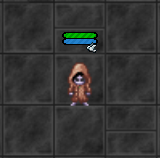
Peaceful Mode
When you enable Peaceful Mode, other players can still attack you, but any kills against you will count as regular frags for them. This acts as a strong deterrent against random player killing.
However, activating this mode comes with certain trade-offs to balance the gameplay:
- Gain 10% less Experience
- Deal 10% less Damage to monsters
- No Ranking Points
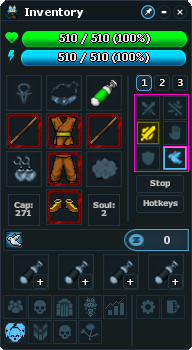
Open your Inventory. On the right side, within the combat options grid, you will find a Dove Icon (bottom-right corner of the grid).
Click this icon to toggle the mode ON or OFF. A confirmation dialog will appear explaining the rules.
Once activated, you can verify your status by looking at your character in the game window.
A small Dove Icon will appear underneath your health/mana bars. This indicates that Peaceful Mode is currently ACTIVE.